Lightning Assist Cancellation & Refund Policy
The current document presents the refund policy approved by Lightning Assist S.R.L. applicable to the subscription fees paid by the customers of Lightning Assist SaaS application, and to the AI Credits and AI Speech Credits packages they buy (section 7).
Effective Date: October 7, 2026
General Information
We follow a reliable refund policy to ensure a fair relationship with all our customers. Please read the guidelines governing the cancellation and refund policy for Lightning Assist S.R.L. and its service(s).
Lightning Assist charges and collects fees in advance for use of its SaaS service. Customers may cancel at any time via any of the methods outlined in this policy.
When a customer creates their account for the first time, they receive a free 14-day Pro Trial—as detailed in our Terms & Conditions. We may also offer free temporary promotion codes for customers. Occasionally, we offer custom promotions and tailored pricing for corporate plans, with rates adjusted to your user count. Corporate plans may be purchased only by Company Accounts, and refunds will be issued to the payment method on file at the time of subscription.
Upon cancellation of the subscription to our service, your data won’t be deleted from our servers, and if you subscribe again to our services, you will be able to access – on the same account – the snippets that you have previously created under the past subscription.
We reserve the right to modify or terminate the Lightning Assist service(s) for any reason without notice at any time.
Fraud: Without limiting any other remedies, Lightning Assist may suspend or terminate your account if we suspect that you (by conviction, settlement, insurance, or investigation or otherwise forcefully removed our branding) have engaged in fraudulent activity in connection with the services offered by us. No refund will be granted in this case.
Fees: Lightning Assist S.R.L. is not registered for VAT, so no VAT is added to our prices; the total shown at checkout is what you pay. The fees that Lightning Assist charges for the SaaS services exclude phone and internet access charges, as well as other data transmission charges. Any currency exchange settlements are based on the customer’s agreement with the payment method provider. To be clear: these charges are the full customer’s responsibility.
1. Eligibility for Refunds
We offer refunds up to the 14th day after the date of purchase based on the use of the quantity refund algorithm described in this policy. All the paid subscriptions are subject to refund but only under the conditions presented in this policy.
You may upgrade from a monthly to an annual plan at any time. Annual subscriptions come with a 14-day refund window—requests made within that period will be honored without further action. If you also want to refund the month-to-month charge from before your upgrade, just contact Lightning Assist Support and we’ll process that for you.
If an invoice is generated when your subscription ends, you won’t be able to upgrade until that invoice is paid. Please allow up to one hour for payment processing—after the invoice is settled, you can immediately upgrade.
2. Refunds Using Quantities
It is common that the refund value varies based on the calculation of the usage of the service and refunds will be prorated based on the quantity of service used by the customer. The specificity of the refunds using quantity criteria is that the refund formula stays the same and only the subscription fee is multiplied by the quantity purchased.
As our payment processor is Stripe, refund amounts are calculated using Stripe's proration method as presented below:
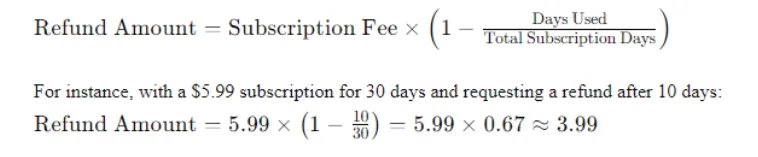
- If you buy a subscription for $5.99 and request a refund after 10 minutes, you will receive the full $5.99 back.
- If you request a refund after 10 days, you will receive approximately $3.99 back.
2A. Company Subscriptions: Adding and Removing Users
Users added to a company subscription are billed pro rata for the rest of the current billing period, as described in our Terms & Conditions. When users are removed, the unused part of the period for them becomes a credit that is deducted from the company's next invoices for the same subscription. This credit is not paid out in cash and is not refunded if the subscription is cancelled. A refund of a company subscription payment follows sections 1 to 6 and is made to the payment method used for that payment.
3. Applying Discounts
Customers can apply promotion codes to reduce the cost of their subscription. Refunds will always be issued on the discounted price.
4. The Process for Requesting a Refund
4.1 Cancelling your subscription
Cancelling is self-service and takes one click. Open the Subscription page in the Lightning Assist app and press Cancel Subscription. Your plan stops renewing, you keep full access until the end of the period you already paid for, and your account then moves to the free plan. Nothing you created is deleted or disabled — every snippet you have keeps expanding as you type.
4.2 Requesting your money back
Refunds are reviewed and issued by a person, not by a button. To request one, open Help in the Lightning Assist app and submit a request with the category set to Refund, or email us at support@lightning-assist.com. You will receive a confirmation email with your request number straight away.
We aim to review every request within two business days. Once approved, the refund is issued through Stripe to the original payment method; please allow 5–10 business days for it to appear in your bank account. Requesting a refund is never conditional on how many support tickets you have opened before, and your statutory right of withdrawal under EU consumer law is unaffected by this process.
5. Refund Methods
Our standard refund method is a Stripe transaction to the original payment method. In cases requiring a manual refund for unused subscription time, and when you meet the eligibility criteria, we can arrange a bank wire transfer to return your funds.
6. Exceptions and Exclusions
Refunds are only available within 14 days of your subscription start date. After that period, you may still cancel your subscription at any time—without entitlement to a refund and with no further obligations or claims.
7. AI Credits and AI Speech Credits Packages
Sections 1 to 6 apply to subscription fees. Credit packages are different: they are bought once, are available immediately and do not expire. As set out in our Terms & Conditions, credits are non-refundable once purchased, except where the law requires a refund or as a goodwill gesture (for example, a duplicate purchase or a verified metering error).
When a refund of a package is made, it covers only the credits that are still unused in your balance at that moment, and those credits are removed from the balance. For example, if you bought 1,000 credits and 200 are left, the refund is for those 200. Credits that were already used are not refunded. For a package bought for a company, the refund goes to the original payment method and the credits are removed from the company's balance.
The credits included with a subscription are part of the subscription: if a subscription payment is refunded under this policy, the credits granted for that payment are removed in the same proportion as the amount refunded.
A payment disputed with your bank (chargeback) is treated as a full refund: the credits granted by that payment, from a package or from a subscription, are removed when the dispute is opened.
To ask for a refund of a package, follow the process in section 4.2. If you are a consumer in the European Union, your statutory right of withdrawal is unaffected by this section.
8. Customer Support Service Contact Information
You can contact our Customer Support by using one of the following ways:
- By phone: +40755359042
- By e-mail: support@lightning-assist.com
9. Amendments to Policy
The above policy applies to all the SaaS services listed on www.lightning-assist.com unless otherwise noted in the corresponding program materials. The current policy may be updated anytime, and customers will be informed of changes via email and on the website.